Handwritten Remover
Remove handwriting from PDFs & images — free.
Upload your document, brush over the handwriting, and download a clean copy. You choose what goes; we protect the printed text and diagrams underneath.
- No sign-up required
- Processed in your browser — never uploaded
- No watermark, no account
Drop a PDF or image here
or browse your files — PDF, JPG, PNG or WEBP, up to 25MB
Your document is processed entirely in your browser. It is never uploaded.
How it works
Three steps, no learning curve
You choose what goes. Everything else — printed text, equations, diagrams — stays exactly as it was.
Upload
Drop in a PDF or a photo of a document. No account, no setup.
Brush over the handwriting
Brush over what you want gone. Only that goes — printed text and diagrams are protected.
Download
Compare the original and cleaned version side by side, then download a print-ready PDF.
See it in action
Handwriting gone. Everything else untouched.
Drag the divider. The worksheet questions, the underline rules, and the number-line diagram are pixel-identical to the original — only the handwritten answers, checkmark, circle, and note were removed.
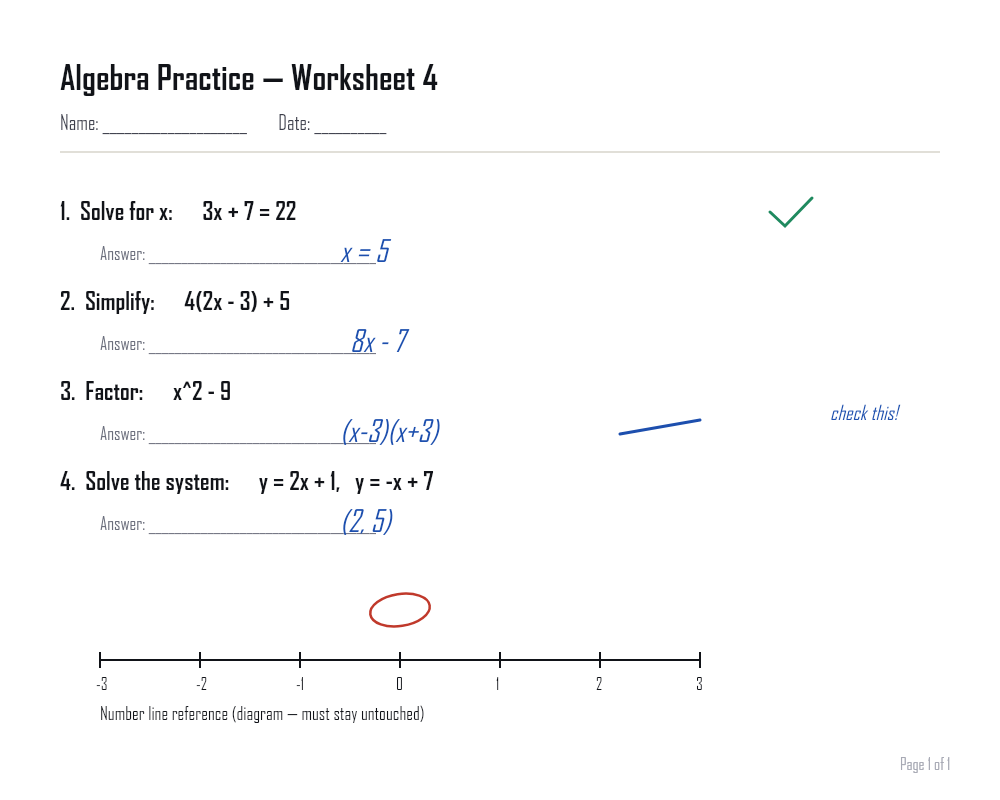
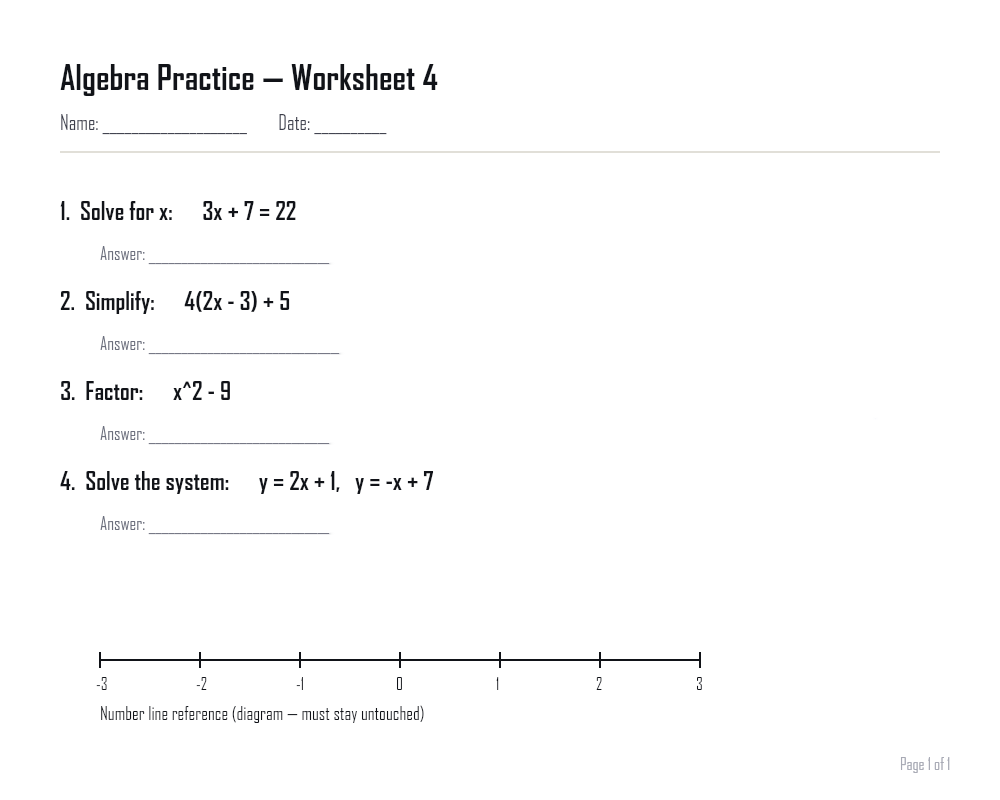 Drag to compare the original and cleaned document
Use cases
Built for real documents
From worksheets to scanned forms, here's what people use it for.
Remove handwriting from PDFs
Clean up scanned PDF packets, worksheets, and forms page by page.
Remove handwritten answers
Reuse a worksheet or exam by erasing filled-in answers while keeping the questions.
Clean scanned documents
Strip pen and pencil marks from scans before filing, sharing, or archiving.
Remove pen marks from PDFs
Erase ink corrections, signatures, and margin notes from a PDF's pages.
Clean photographed paperwork
Take a phone photo of a written-on page and get back a clean, readable copy.
Remove handwritten annotations
Take margin notes, circles, and arrows off diagrams and printed pages.
Ready to clean up a document?
No account, no upload, no watermark — mark the handwriting and download the clean copy.
Upload a documentFAQ
Frequently asked questions
Can I remove handwriting from a PDF?
Yes. Upload a PDF and each page is handled separately. Pages with handwriting are cleaned; pages with no handwriting at all are left completely untouched — including their original vector text where the PDF has it — instead of being needlessly reprocessed.
Can I remove handwriting from a photo?
Yes. JPG, PNG, and WEBP photos are supported. Phone photos are rotated using their embedded orientation data. Note that tilt and perspective distortion are not corrected — a heavily skewed photo is processed as-is.
Will printed text be removed?
The system is built specifically to avoid this. Nothing outside the area you brush is ever touched, and inside it the ink is masked tightly against the local paper rather than blanking a whole block — printed text, equations, diagrams, and tables are protected, and every pixel outside your mark is verified unchanged before you get the file.
Can it remove handwritten answers?
Yes — handwritten answers, calculations, checkmarks, circles, and grading marks are the main use case. Brush over them and they go. Where handwriting sits directly on top of printed text, the area it covers is reconstructed from the surrounding background, since the covered printed content is not recoverable from a single image.
Does it work with scanned documents?
Yes, scanned documents are a primary use case, including multi-page scanned PDFs and single scanned images.
Do I need to create an account?
No. There is no sign-up, login, or account of any kind. Upload a file and download your result.